

Step into the new year with stronger automation 🎆
The 2025.4.0 holiday release brings a set of automation gifts to help you wrap up the year with cleaner runs, less manual cleanup, and more stable coverage across your business critical systems.
Before upgrading, we recommend reviewing the Upgrade Matrix to confirm compatibility, and requirements for preparing your environment.
To ensure compatibility between this Leapwork Release and your system requirements, including OS and browser drivers, please refer to our System Requirements article.
Why upgrade?
Kick things off with the holiday release highlights video for a quick tour of what is new in 2025.4.0 and how it helps you finish the year with stronger, more reliable automation.
In this release you get:
- A new Close browser block to keep Salesforce Fusion and other web flows tidy and under control.
- Full IBM PCOM 5250 support so long running IBM i green screen processes can finally join your automation strategy.
- A more flexible D365 F&O login experience with stronger MFA handling and clearer visual feedback.
- Smarter cross device web testing with a curated device list and manual proxy options per flow.
- Better control over Excel data types so your formulas survive the holiday crunch without surprises.
When you are ready to dive deeper, the sections below walk you through each new feature and enhancement in more detail.
🚨New Features
Close browser block for Salesforce Fusion flows
Leapwork Studio now includes a dedicated Close browser block for Salesforce Fusion flows. This makes it easier to clean up test environments and avoid leaving unwanted browser sessions open.

Key details:
- Lets you close any browser window started by Leapwork Fusion within the flow.
- Works with sessions started from Salesforce, D365, or Generic Web.
- The block can be renamed, and the Fail connector can be used to handle exceptions.
- Run logs show clear messages for every browser close action
Leapwork support for IBM PCOM 5250 green screen automation
Leapwork now provides full support for the 64 bit IBM PCOM 5250 emulator. This enables end to end automation of IBM i (AS/400) green screen flows on Windows 10 and 11.
Key details:
- Automates complete terminal sessions including launch, navigation, reading and writing fields, function keys, and logoff.
- Allows critical IBM i processes to be included in your test automation strategy in a stable and repeatable way.
- Automatically detects emulator architecture (x86/x64).
- Resolves DLL conflicts for more stable runs.
- Supports seamless switching between compatible emulators.
- Validates all core Green Screen blocks and Recorder features for PCOM 5250.
🛠️ Feature Enhancements
Fusion recorder for D365 F&O: Multi-Factor Authentication (MFA) support
Login automation in D365 F&O is now more flexible and robust, even when MFA or unexpected steps appear. You can switch between automated and manual login, capture every step of the access flow, and connect TOTP block based MFA directly from the Login block.

Key details:
- New Login method attribute in the Login block and popup with two options:
- Automated uses preconfigured credentials.
- Manual records login steps live with Fusion recorder.
- Supports capturing any element in the login flow, including additional authentication and MFA.
- Allows manual recording of the login if automatic login fails, including Validate and Get actions.
- Adds a new OTP result code attribute in the Login block for easy integration with TOTP blocks and automated MFA.
Elegance design enhancements in Run List section
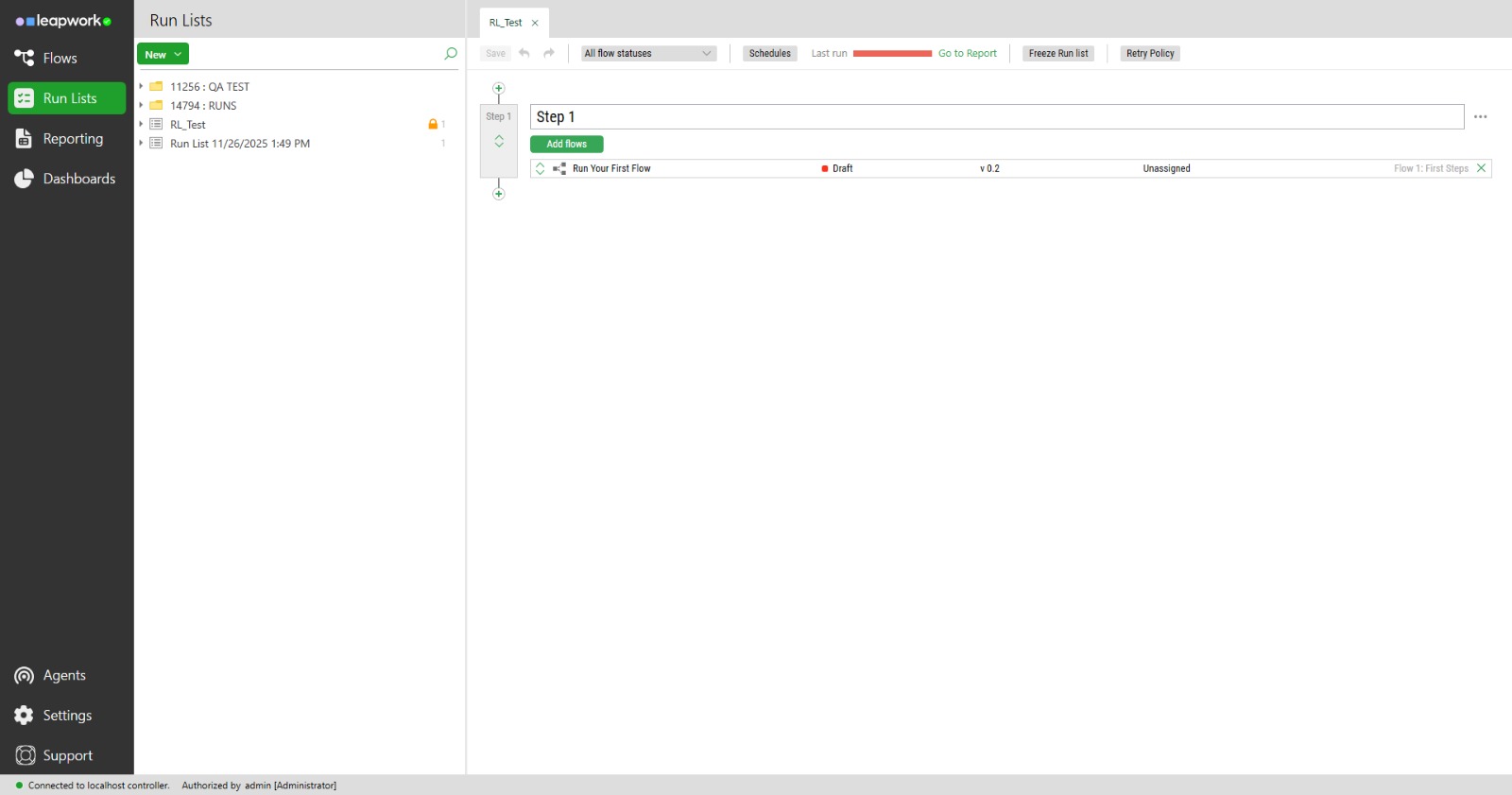
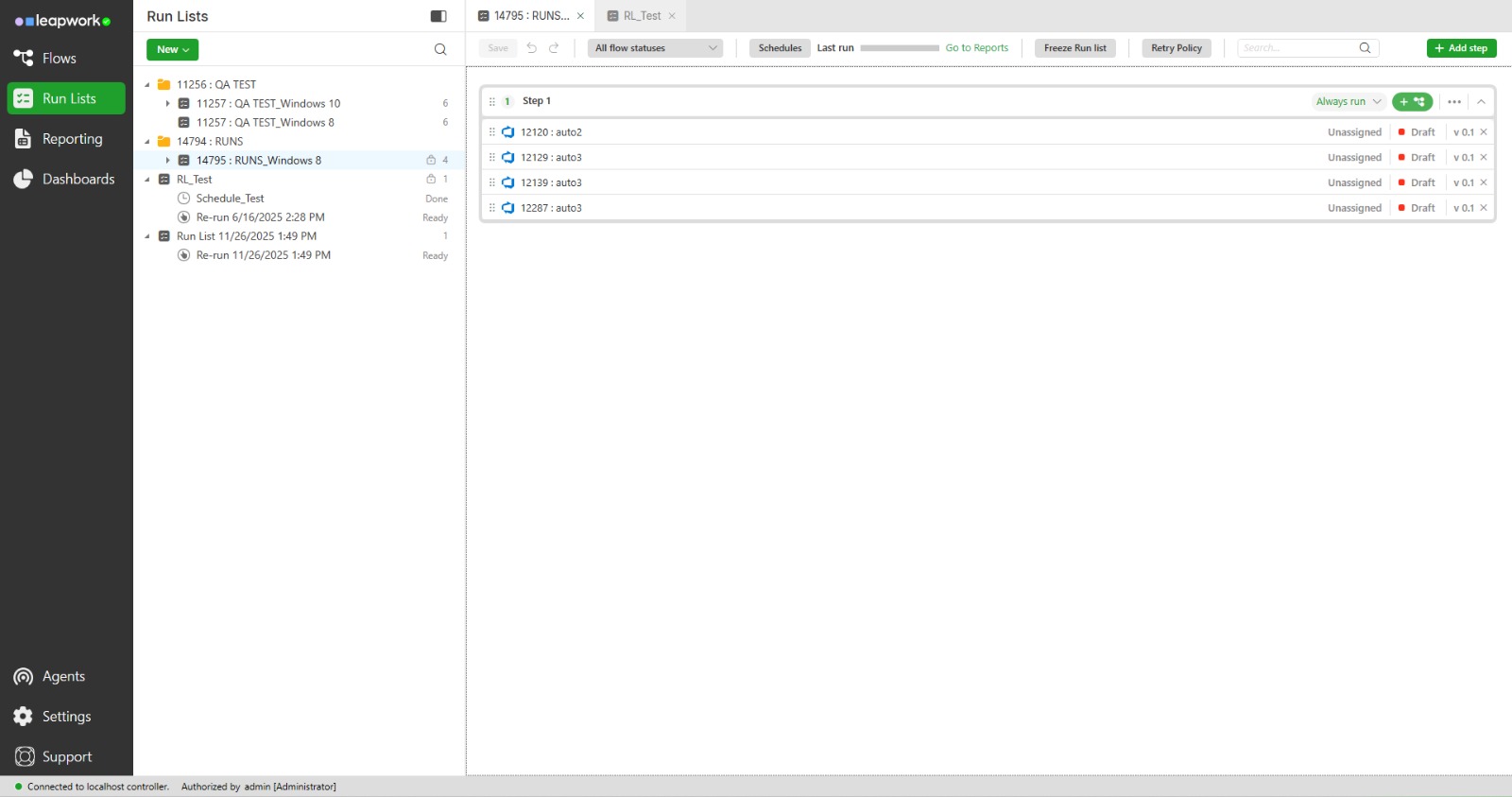
Leapwork Studio introduces a redesigned experience for Run Lists, making it easier to organize, customize, and execute your automated flows. The new interface brings enhanced usability, improved search, and more intuitive controls for managing complex test scenarios.⤢
BEFORE
AFTER
Key details:
- The UI for frozen run lists now clearly displays relevant information (date, user who froze it), disables non-permitted actions, and maintains a consistent visual experience.
- Highlighting a run list no longer leaves unwanted white space, resulting in a cleaner and more polished look.
- You can now search for flow and step names within a run list, with clear visual indicators for found results.
- The retry policy modal has been redesigned.
- Users can add, edit, resize and remove notes directly below individual blocks via the context menu, with notes staying attached to the block and visible to anyone who can access the flow.
- The top menu and tabs in run lists have been updated to match the new design, including new icons and quick-access buttons for key actions.
- Steps now feature a new design, and you can add a step directly from the green button in the top bar for easier configuration.
- Flows or steps can be temporarily hidden from a run list without deleting them, using a new eye icon to toggle visibility.
BEFORE
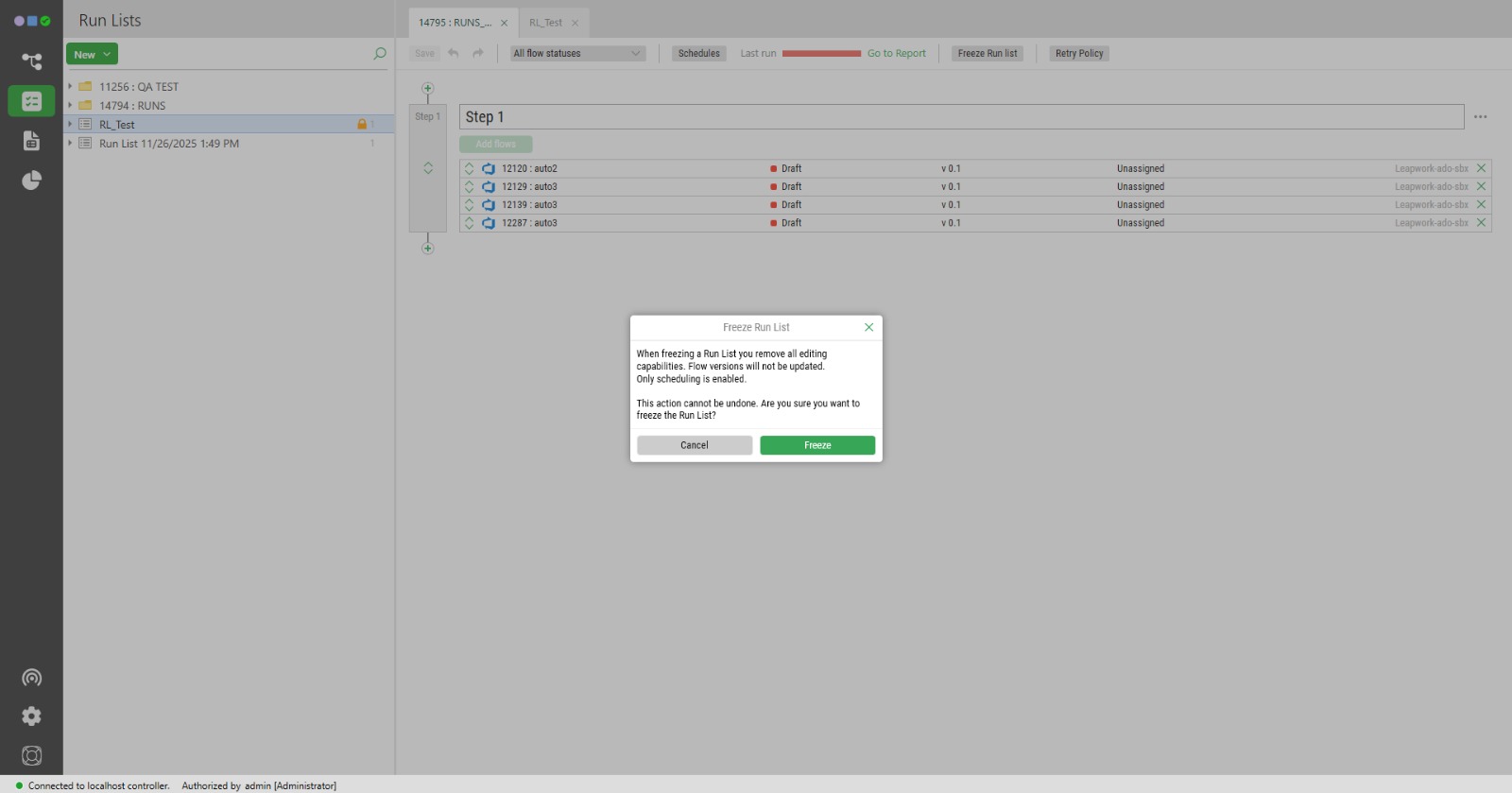
AFTER
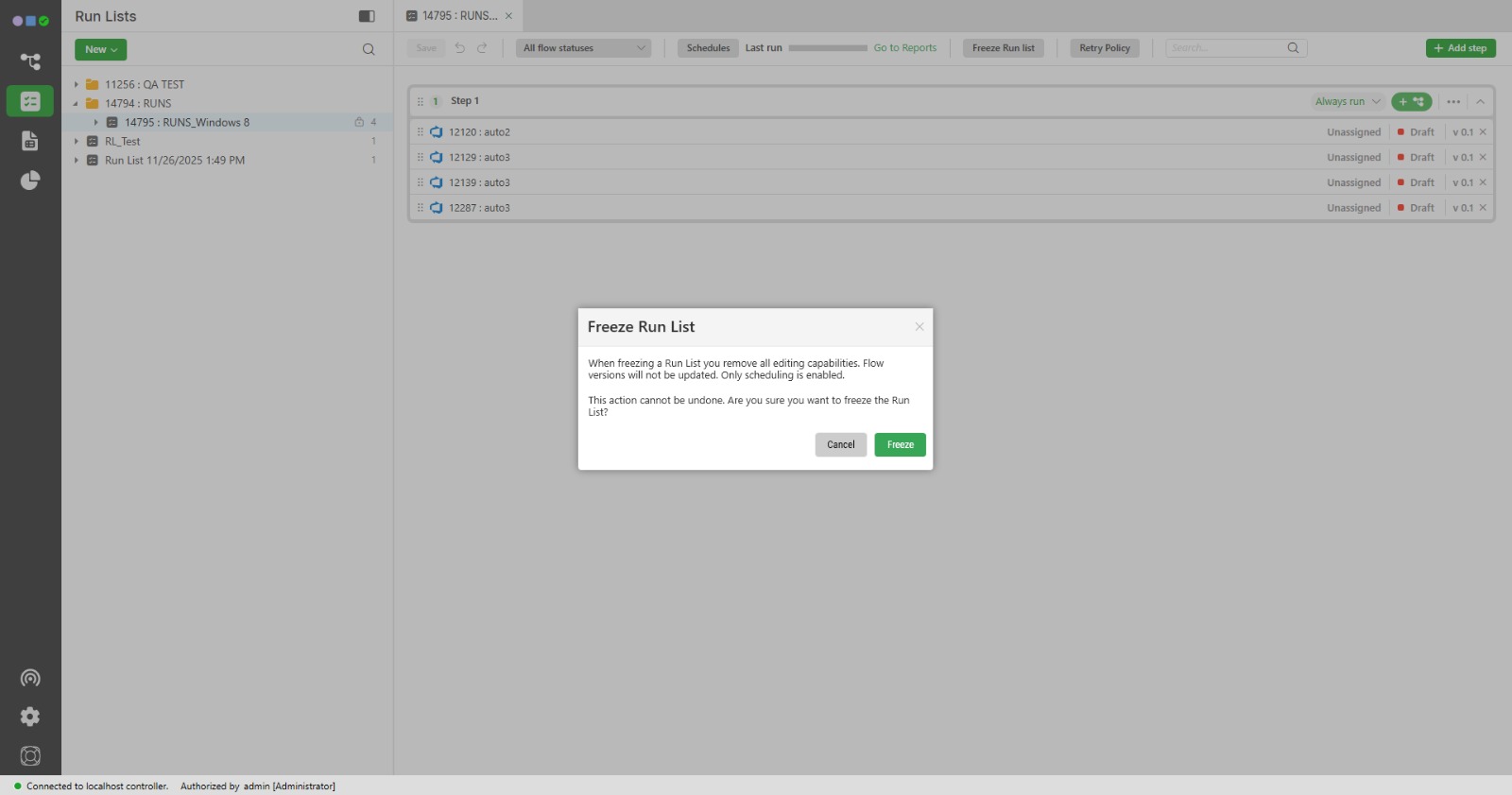
BEFORE
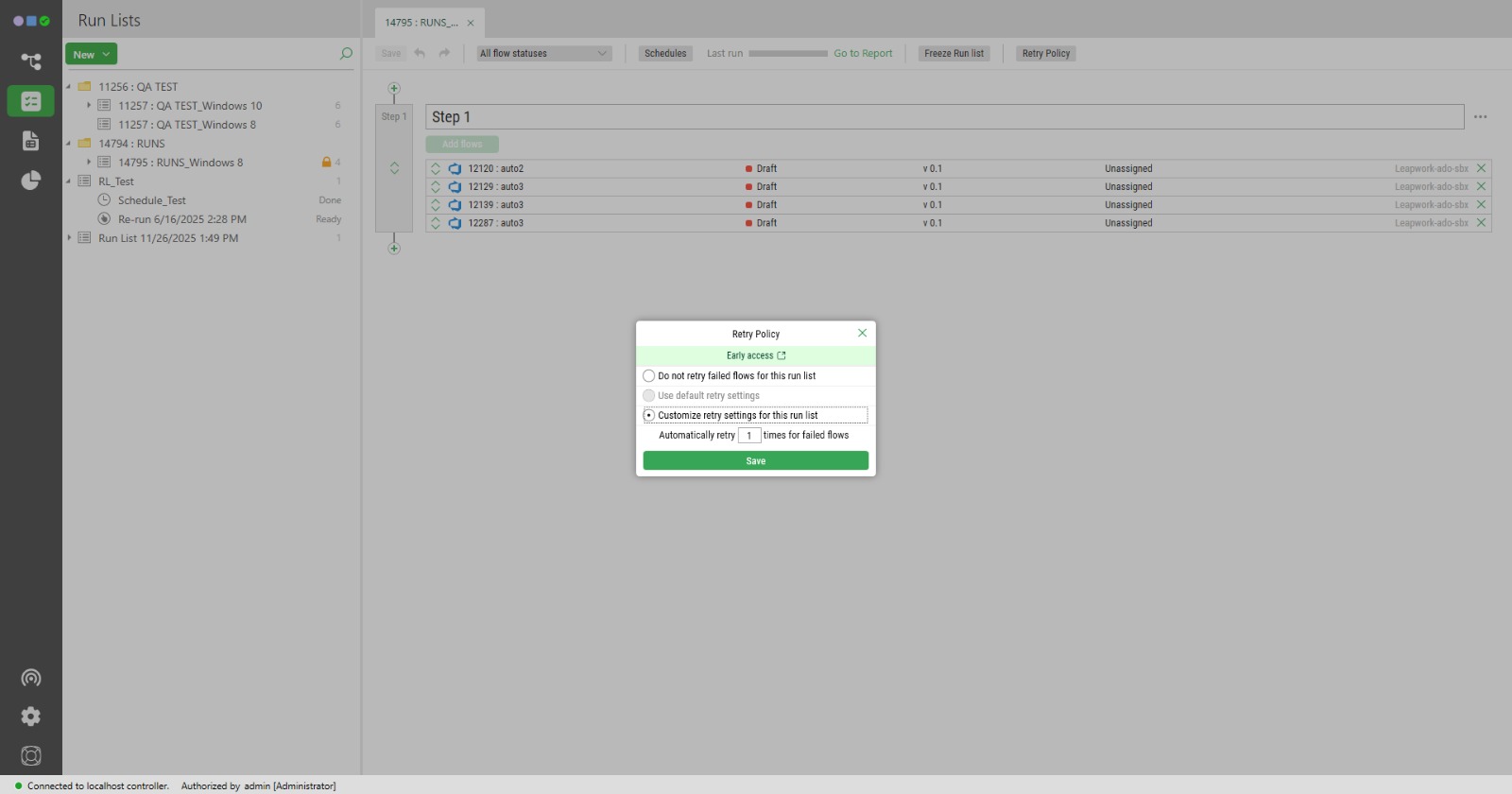
AFTER
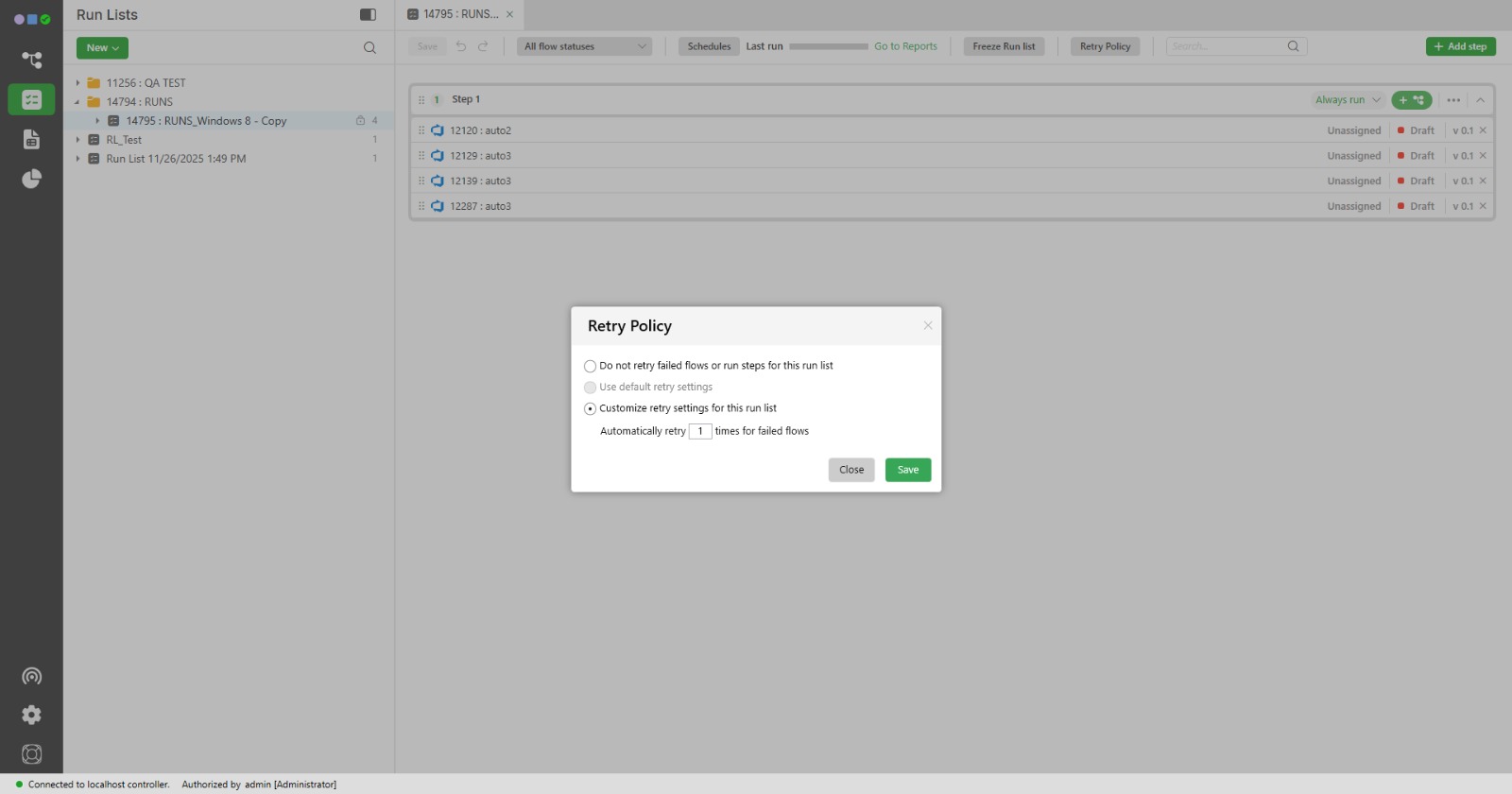
Start Web Browser block improvements
Leapwork Studio now includes several improvements to the Start Web Browser block, making cross device web testing and network behavior more predictable and easier to manage.
Key details:
- The Device type list is now curated and browser accurate, showing only devices currently recognized by Chrome and Edge across Android, iPhone, and tablet, grouped by browser and device category.
- Proxy command line flags passed in the Start options field are handled more reliably, applied consistently to Chrome and Edge for that flow, and take priority over global or system level proxy configuration.
Auto-apply formatting in Write Excel block
The Write Excel block now includes an Auto-apply formatting option. This lets you control whether Excel automatically applies number and date formats when writing data, without having to define data types per cell.

Key details:
- A new Auto-apply formatting checkbox controls how values are written to Excel.
- When the checkbox is selected, the block automatically detects data types such as numbers, decimals, integers, dates, and text, and applies the corresponding Excel formatting when writing the file.
- When the checkbox is cleared, all values are written as text, with no automatic conversion or formatting.
- This reduces broken formulas and inconsistent formatting while keeping control over how Excel files are generated from your flows.
Leapwork Studio now makes it much easier to migrate chained or inherited test cases from RSAT. When you use the RSAT migration tool, variables passed between test cases are automatically converted into Leapwork’s Set variable and Get variable blocks, or as tokens within blocks, without manual mapping.
Key details:
- Seamlessly migrates complex RSAT test flows that rely on variable passing between cases.
- Automatically detects variables and maps them to Leapwork’s variable handling blocks so your automation logic stays intact.
- Reduces manual effort and the risk of errors during migration, letting you focus on testing instead of rework.
🐞 Bugs & Improvements
- Web adapter: More reliable Chrome and Edge launches, including with custom profiles. Fixed ServiceNow login issues. GitHub Actions schedules now run consistently.
- Desktop adapter: Improved element capture for IBM i ACS and the Leapwork Studio UI.
- Studio: Better run list and flow stability, improved UI consistency and performance, and fixes for issues related to saving, multi monitor setups, step reordering, block connections, tooltips, and user management.
- Agent and controller: Improved cloud agent deallocation, more robust API validation, and more reliable exports. Fixed issues with TeamCity triggers, HTTP requests on cloud agents, C# block execution across distributed components, and variable updates.
- AI: Stronger quota enforcement and more reliable Copilot and AI analysis activation. Fixed issues with AI block usage limits and initial activation from the client portal.
- Cloud enablement: Improved Leapwork Cloud stability and UI. Resolved intermittent controller name display issues and websocket connection resets in Studio.
- Mobile (Android and iOS): Improved element capture and scroll reliability on iOS. Fixed issues with manual image capture, outdated .ipa files, widget interference, and intermittent cloud connection failures.
- D365 adapter: Major improvements in recorder reliability, block execution, and UI consistency, resulting in a smoother experience for complex D365 scenarios.
- Generic: Improved UI consistency and installer experience, with fixes for tooltip backgrounds, icon sizing, agent settings, migration, reporting performance, popup accuracy, and several edge cases in document handling, offline installation, and browser profile management.
- Java adapter: Fixed an issue where the Close UI Window block did not close Java applications when using the Send Win Message method, improving reliability for Java automation flows.
- License engine: Improved the offline license activation process to avoid misleading connectivity errors. Clarified user seat limit notifications to make license management more transparent.
- MS OAuth: Increased audit log consistency and event ordering when changing default user directories across SSO, AAD, and LDAP integrations, making logs more predictable and easier to audit.
- SAP adapter: Resolved intermittent connectivity issues with SAP Solman URLs, providing more reliable access and integration with SAP environments.
What next?
These updates aim to enhance your experience with our platform, providing improved security, efficiency, and usability. We encourage you to explore these features and take advantage of the improvements in this release. Thank you for your continued support!
If you have any questions, contact your Customer Success Manager or speak to one of our Automation Specialists via website chat.
Happy automating! 🤖✨