
AI Validate Block
The AI Validate Block is designed to validate AI-generated responses against expected outcomes, which is crucial in testing environments where accuracy and consistency are paramount.
This block can be adapted to various testing scenarios, allowing for mass validation and facilitating the automation of tests across multiple applications and platforms.
Note: AI accuracy is not guaranteed, as it relies on probabilities and the daily performance of OpenAI’s technology. While we strive to provide the best experience, occasional inaccuracies or errors may occur due to the inherent limitations of the technology itself. For more details, please refer to OpenAI's documentation.
Fully expanded, the AI Validate Block shows the following properties:
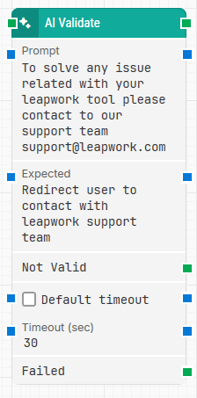
Note: The block design shown above is part of the new Elegance Design, introduced in Leapwork version 2025.3. Earlier versions may display a different layout.
The Block Header (“AI Validate”)
The green input connector in the header is used to trigger the block to start executing.
The green output connector in the header is triggered when the block execution is complete.
The title of the block (“AI Validate”) can be changed by double-clicking on it and typing in a new title.
Input
The Input field is used to enter the information supplied by your GenAI.
Expected
The Expected field is used to specify the anticipated result.
Not Valid
This green output connector triggers if the input field does not match the expected field.
This connector can be used to branch the execution of the flow depending on whether the validation is successful or fails.
Default Timeout
The Default Timeout sets the timeout value to 30 seconds if checked. If unchecked, the timeout follows the value specified in the flow settings.
Updated 17.12.25